Everything you need to launch
Works out of the box
Complete and ready to deploy. Everything you need is included—just add your audio files and go.
Deploy anywhere
Host it anywhere. No database, no monthly fees, switch providers anytime.
Online + Offline
Works without internet. Perfect for museums with weak WiFi or underground exhibits
Built for visitors on the move
Large buttons, clear progress, easy to use while standing. Designed for people walking through exhibits, not sitting at desks.
Match your brand
Add your logo and colors through simple settings. No coding required, but full source access if you need it.
INTEGRATIONS
Use your existing tools—host audio on any CDN, track visitors with your analytics platform, process payments through your provider.
Who is it for?
Museums, galleries, cities and cultural institutions
Developers building audio guides and self-guided tours
Agencies and tourism boards delivering exhibition and cultural projects
Own it forever. No recurring fees.
AudioGuideKit
Only pay for hosting (typically $0-$10/month for static sites)
Commercial platforms
TypicalPlus setup fees, per-visitor charges, and annual contracts
Save annually $6,000 - $24,000 compared to typical commercial platforms. One-time setup investment, lifetime ownership.
Designed for the modern visitor
Light and dark themes included. Easily customizable to match your brand.
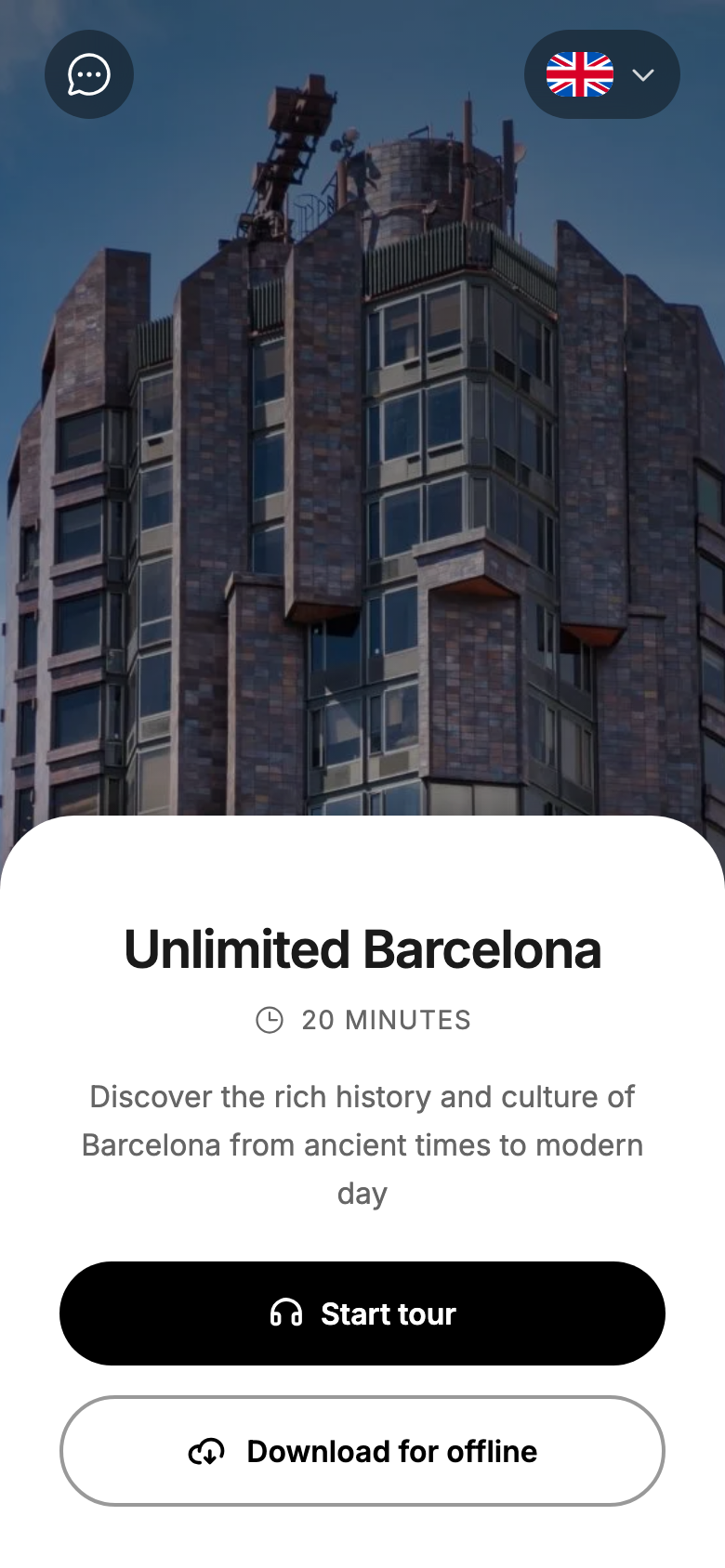
Quick overview
Get a clear overview of the guide and use it online or offline.
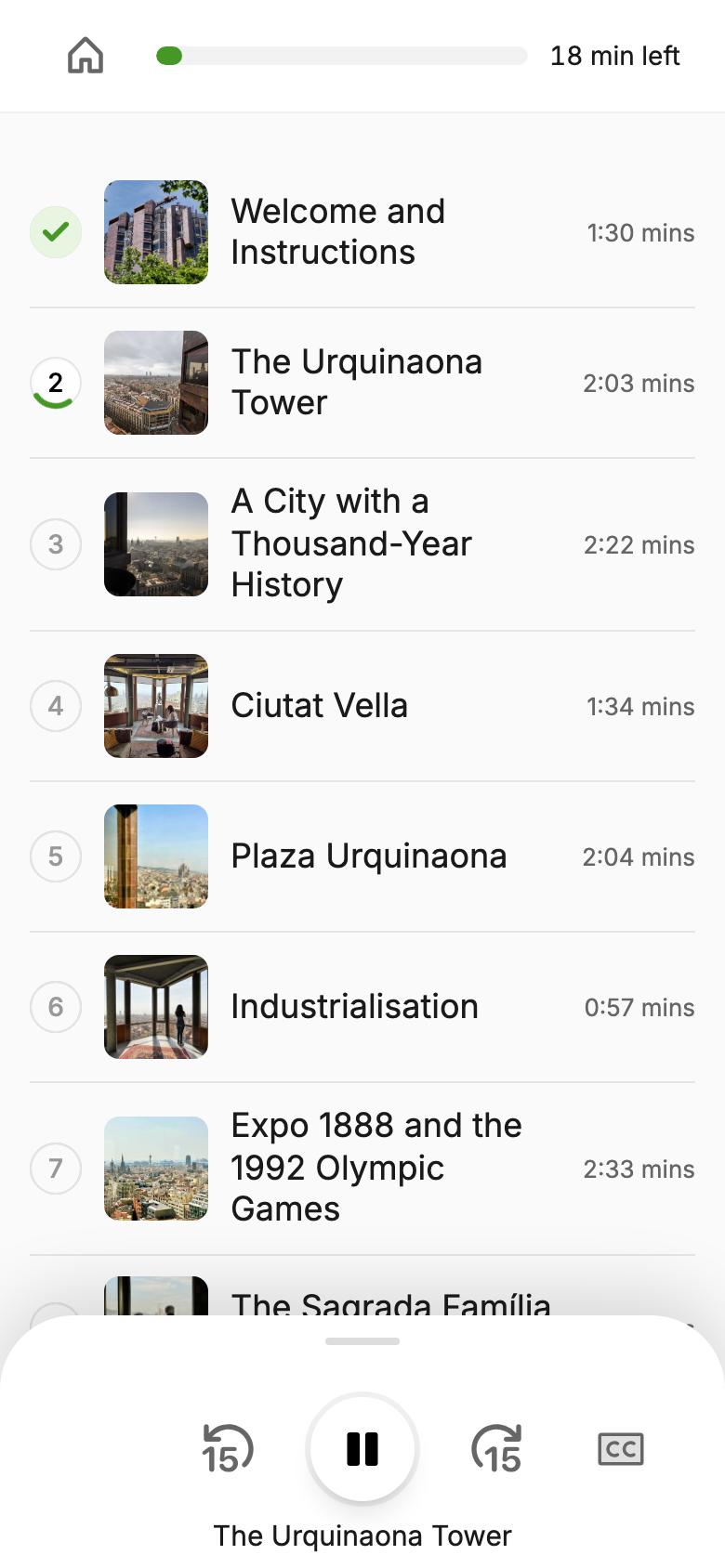
Simple audio guide
All stops in one place, with a simple audio player and transcript support.
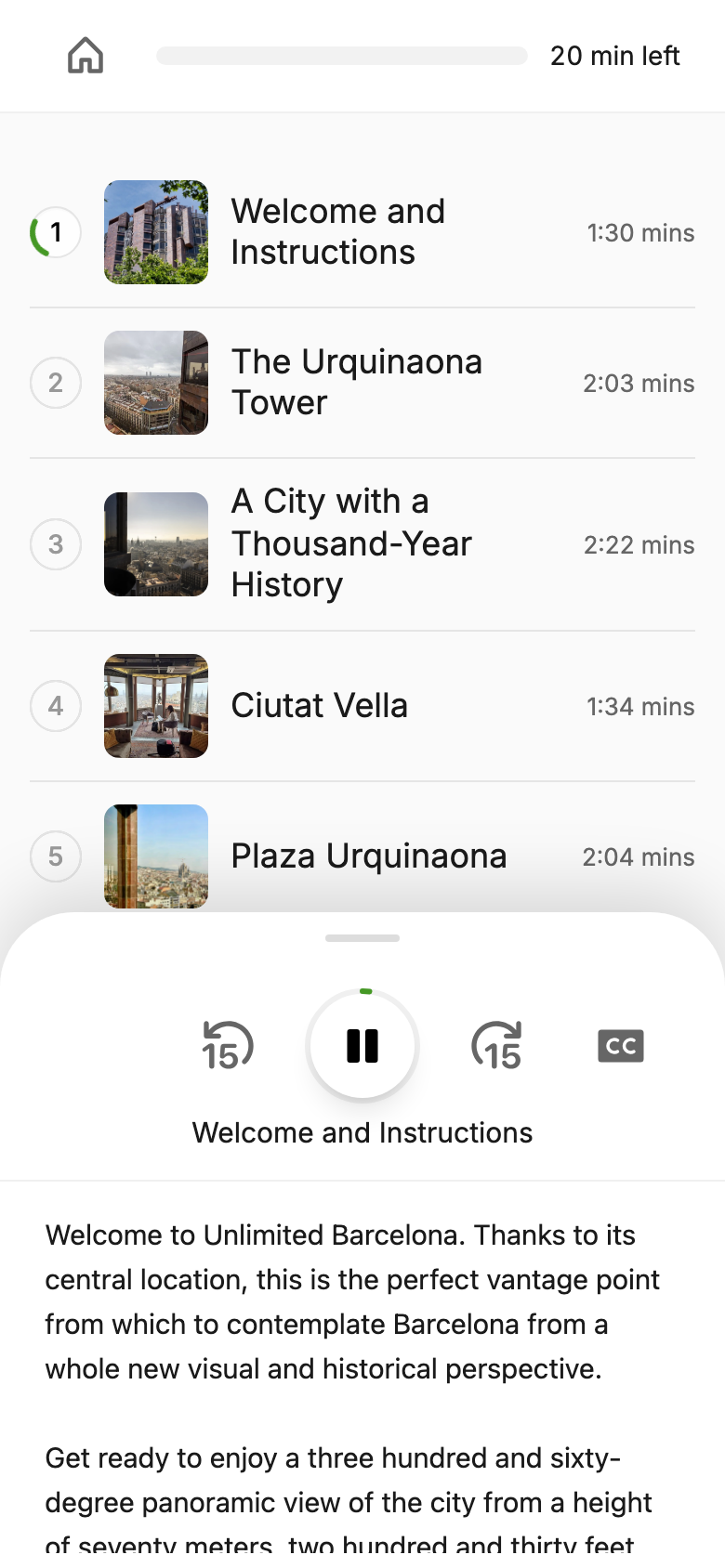
Full transcripts
Follow along with complete transcripts for every audio stop.
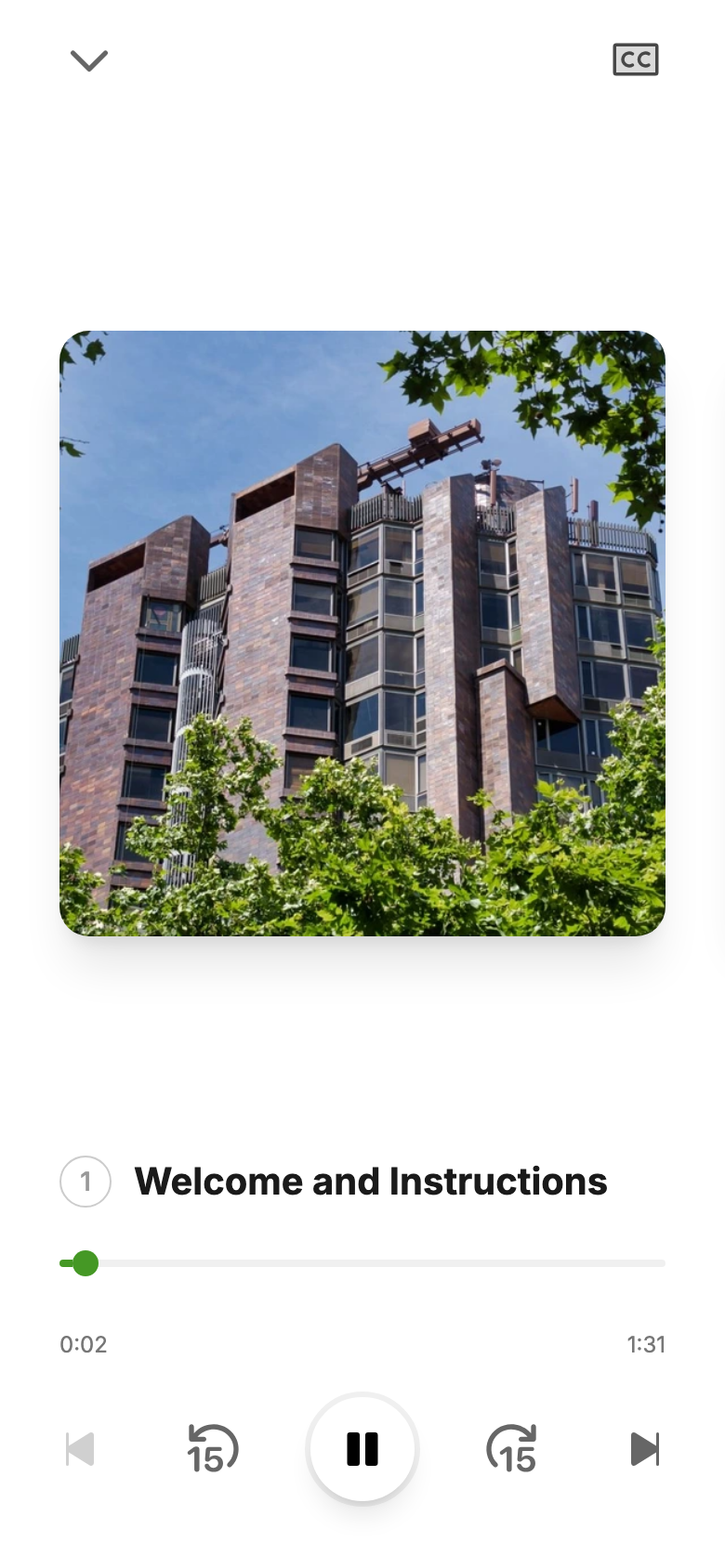
Fullscreen player
An immersive fullscreen experience for focused listening.
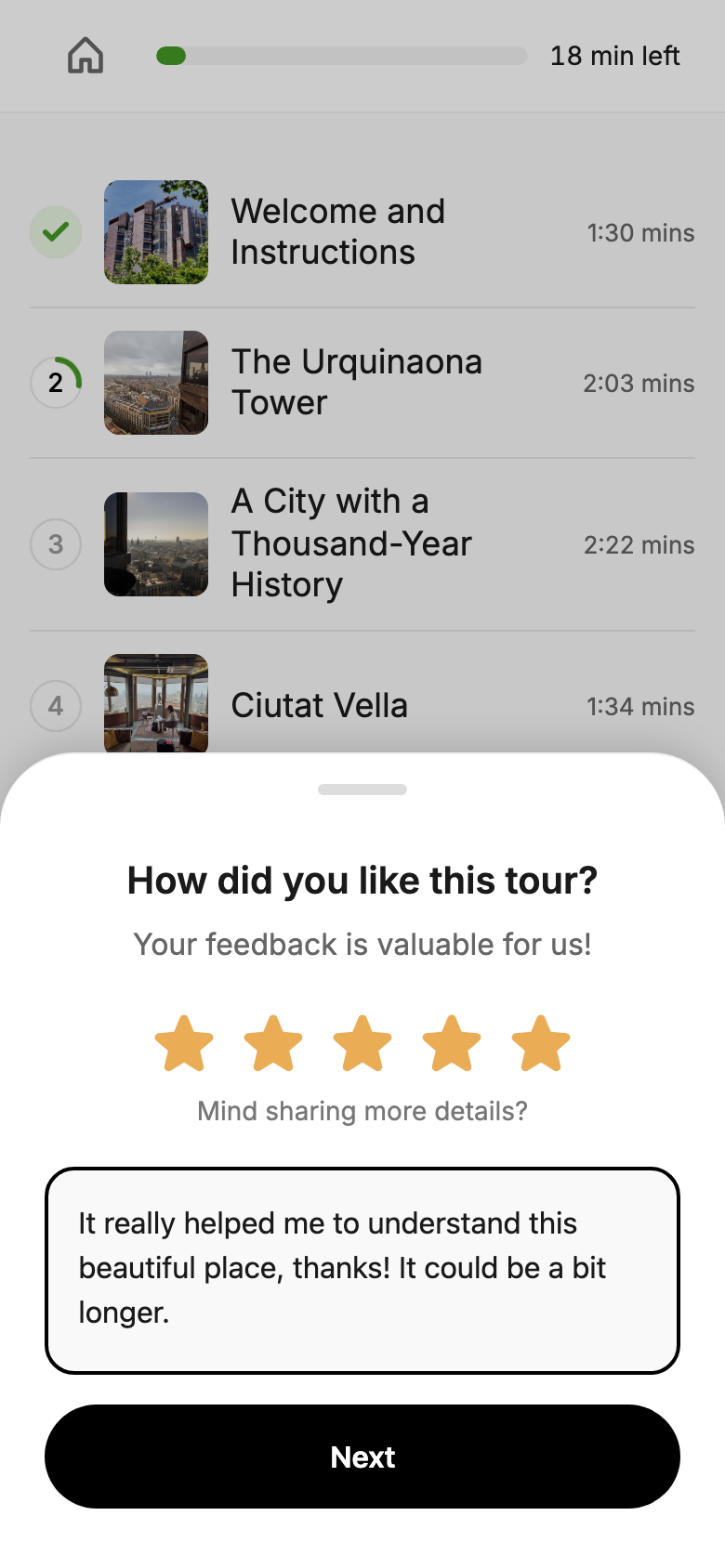
Visitor feedback
Collect visitor feedback once the guide is complete.
Test the player now
Experience our player on your own in seconds by scanning this QR code or clicking the button below.
Try the player
Clone the repository
Access the player source code
Add audio content
Use local files or CDN-hosted assets
Customize main config and theme
If you don't like the default settings, customize them
Deploy the app
Host anywhere that serves static files
Timeline: Initial setup takes 15-20 minutes. Adding your content depends on your audio preparation—typically 1-2 weeks including recording and metadata.
Fully static. No servers, no databases, no maintenance.
A developer-friendly workflow
Everything lives in your git repo
1. Editing guide content
Content lives in a simple JSON file. Edit stops, metadata, and audio links directly, and reorder the guide by changing the item order.
01 {
02   "id": "barcelona",
03   "language": "en",
04   "title": "Unlimited Barcelona",
05   "description": "Discover Barcelona from ancient times to modern day",
06   "totalDuration": "20 minutes",
07   "totalStops": 10,
08   "stops": [
09     {
10       "id": "1",
11       "type": "audio",
12       "title": "Welcome and Instructions",
13       "duration": "1:30",
14       "image": "/images/01.jpeg",
15       "audioFile": "/audio/en/01.mp3",
16       "transcription": "Welcome to Unlimited Barcelona..."
17     }
18   ]
19 }
2. Customizing the app features & layout
Control every aspect of your guide's behavior and appearance. Configure UI elements visibility and style, theme selection, offline mode and more. All from the same JSON configuration file.
01 {
02   "id": "barcelona",
03   "defaultLanguage": "en",
04   "offlineMode": "optional",
05   "transitionAudio": "/audio/chime.m4a",
06   "themeId": "default-light",
07   "transcriptAvailable": true,
08   "collectFeedback": true,
09   "showLanguageLabel": false,
10   "showStopImage": "thumbnail",
11   "showStopDuration": true,
12   "showStopNumber": true,
13   "fullscreenPlayer": true,
14   "showProgressBar": true,
15   "backgroundColor": "#1A2634",
16 }
3. Customizing the theme
Fine-tune the look and feel using a single TypeScript configuration if the built-in themes don’t fit your needs. Adjust colors, typography, and spacing without touching the core code.
01 export const theme = {
02   colors: {
03     brand: "#1a1a1a",
04     accent: "#E2E2E2",
05     background: "#ffffff",
06     text: "#000000"
07   },
08   typography: {
09     fontPrimary: "Geist Sans",
10     fontMono: "Geist Mono",
11     baseSize: "16px"
12   },
13   borderRadius: "12px"
14 }
4. Multi-language support
The UI now supports 6 languages. Additional languages can be added through simple translation files and they will work out of the box.
01 import { Translations } from '../types';
02
03 export const de: Translations = {
04   loading: {
05     tourData: 'Tourdaten werden geladen...',
06     preparing: 'Ihre Tour wird vorbereitet...',
07   },
08   errors: {
09     loadFailed: 'Fehler beim Laden der Daten',
10     retry: 'Erneut versuchen',
11   },
12   // ...
13 }
Why audio guide player?
We built this to solve our own audio guide needs (read the full story). After evaluating existing solutions, we found most were either expensive locked-in platforms or clunky hardware rentals. This is a modern alternative you actually own.
Why is this open source?
Audio playback shouldn't lock you into a vendor (it happens more often than not). Open source means you see exactly what runs, avoid vendor dependency, and everyone benefits from improvements.
Can I use this commercially?
Yes. This project is open-source with an MIT license, which allows commercial use without restrictions.
Does it work only for audio guides?
No. While it's designed for museums and galleries, you can adapt it for any audio-based application. Audio guides for cultural institutions remain our primary focus, so expect continued development in that direction.
Why doesn't this include a CMS?
A CMS turns a player into a platform. Authentication, permissions, media management—that's a different scope entirely. We deliberately focus on the player itself. However, a simple headless management system for audio guides is on the roadmap for later in 2026.
How do I actually 'deploy' this?
It's a standard website that you can host on any web server. Popular options include Vercel, Netlify, or your own infrastructure. No database, no backend server required. If you can upload files to a web host, you can deploy this.
What's the catch?
You need to invest some time, especially if you have limited technical experience. You'll handle updating configuration files and managing your guide content. With basic technical knowledge and our step-by-step documentation, most teams can successfully implement this.
What technical skills do I need?
Basic web development knowledge is helpful: editing configuration files (JSON), uploading files to a server, and using version control. If you have a web developer on staff or work with a development agency, they'll find this straightforward to implement.
Where can I get help?
The documentation covers step-by-step setup and common scenarios. For technical questions or community support, open a GitHub issue.
Do you offer implementation services?
Yes. We provide paid consulting for setup, content migration, customization, and training. Whether you need full implementation or just initial guidance, we can help. .
Is there a roadmap?
Yes. We maintain an active roadmap based on our own requirements and user feedback. Check the updates page for current progress, or submit feature requests via GitHub.
End of FAQs
Solve a single problem without feature creep.
Your data, your infrastructure. No lock-in.
Fewer moving parts mean fewer surprises.
Clear for developers. Smooth for visitors.